
Your Chartplotter Died. Now What?
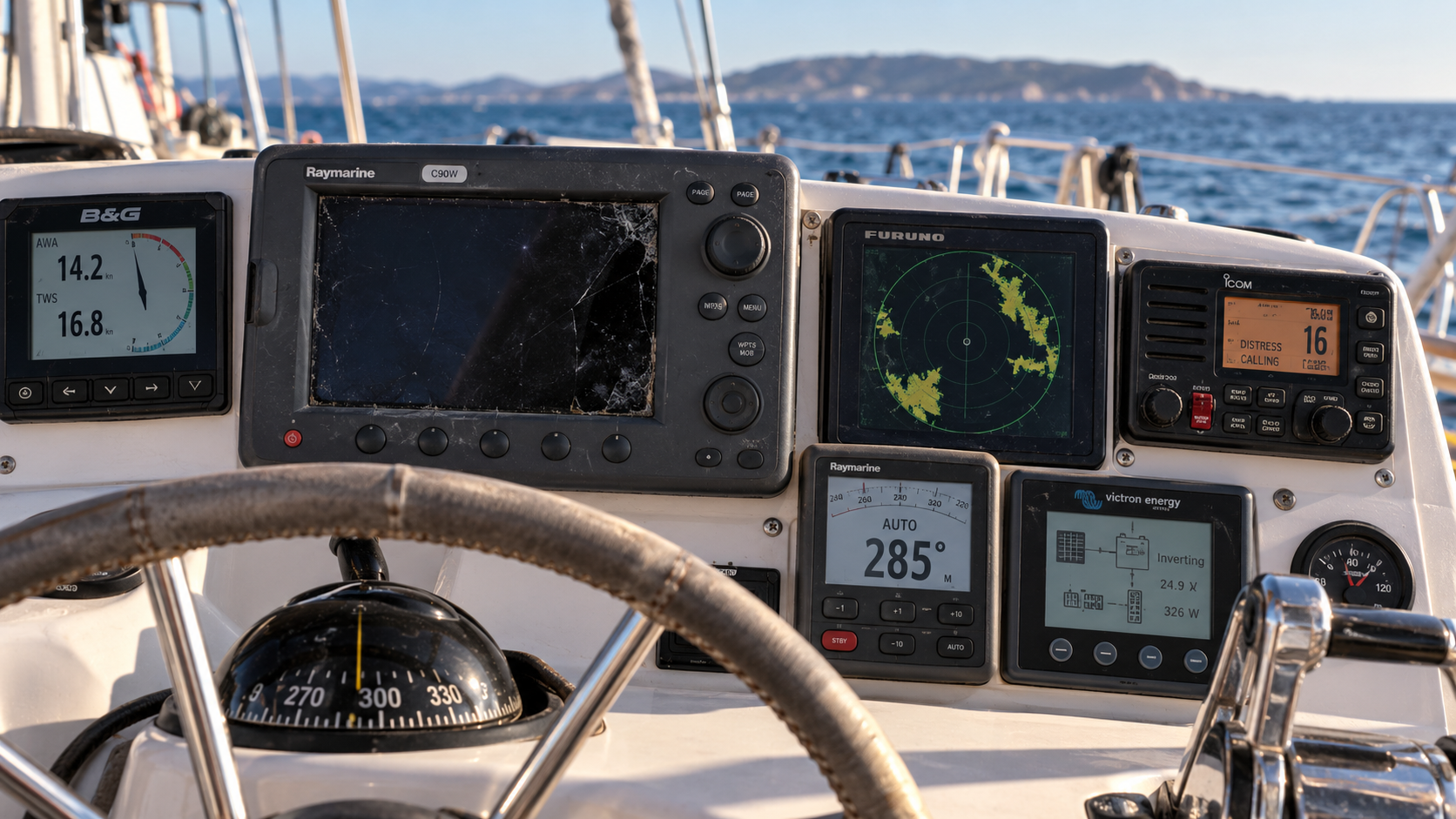
Before you replace everything connected to it, find out what you can keep.
Your chartplotter just died.
At first, the solution seems obvious: replace it with a new chartplotter.
But on an older boat, replacing a chartplotter can quickly turn into replacing the radar, autopilot, instruments, transducers or other marine electronics connected to it.
Before you start an expensive electronics refit, it is worth finding out what you can keep.
Many older marine electronics can continue working as part of a modern navigation system. The key is understanding what is already onboard, how it communicates and what actually needs replacing.
The chartplotter became more than a display
For many boats, particularly those whose electronics have evolved over ten, fifteen or twenty years, the chartplotter gradually became the centre of the navigation system.
It displays charts, but it may also bring together information from other equipment onboard.
GPS position. Depth. Wind. AIS targets. Radar. Autopilot information. Routes and waypoints.
Over time, equipment gets added and replaced. Some of it may use NMEA 2000. Some may still use NMEA 0183. Some may communicate over Ethernet or manufacturer-specific networks.
You may have B&G instruments, a Raymarine autopilot, Furuno radar, Icom AIS and Victron electrical equipment all happily doing their jobs on the same boat.
That’s not unusual.
It’s a boat.
As long as everything works, there isn’t necessarily a reason to think about the architecture underneath it.
Then the chartplotter dies.
And suddenly the question isn’t simply:
What should I replace my chartplotter with?
A better question may be:
What do I actually need to replace?
Can I replace my chartplotter without replacing everything else?
Sometimes, yes.
A failed chartplotter does not automatically mean your radar, autopilot, AIS, wind instruments or depth equipment also need to be replaced.
A fifteen-year-old display may have failed while most of the equipment connected to it continues working perfectly well.
Your wind sensor still knows the wind speed and direction.
Your depth transducer is still measuring depth.
Your AIS is still transmitting and receiving.
Your autopilot may still steer the boat beautifully.
Your radar may still be perfectly serviceable.
The challenge is often not whether those devices still work.
It’s whether your new system can communicate with them.
That distinction can potentially save a lot of unnecessary replacement.
Can old and new marine electronics work together?
Often, yes.
Marine electronics have gone through several generations of networking and communication standards.
Older equipment commonly uses NMEA 0183. Newer equipment may use NMEA 2000. A boat may also contain CAN, Ethernet, serial connections and manufacturer-specific networks.
That can make an older boat look complicated.
But different doesn’t automatically mean incompatible.
Gateways and interfaces can often bring information from older equipment into a modern network or operating environment.
The important first step is understanding what is actually onboard.
What equipment do you have?
How is it connected?
Which components still work?
Which protocols do they use?
Which component actually failed?
And most importantly:
What are you trying to accomplish?
You may discover that much more of your existing system can remain onboard than you expected.
Can I keep my existing autopilot?
Possibly.
An older autopilot does not automatically need to be replaced because the chartplotter connected to it has failed.
Depending on the autopilot and how it communicates, it may be possible to continue using it as part of a modernized navigation system.
This matters because replacing an autopilot can involve much more than changing a display. There may be a course computer, heading sensor, rudder feedback sensor, drive unit and multiple control heads involved.
If the autopilot is reliable and doing its job, it is worth understanding the integration options before removing it.
Can I keep my existing radar?
This depends much more heavily on the radar.
Radar compatibility can be manufacturer and model specific, particularly with older equipment.
Some existing radars can be integrated into a newer operating environment. Others may require their original display, a compatible replacement or ultimately a new radar.
Don’t assume either way.
Find the exact manufacturer and model before deciding what needs to be replaced.
Do I need to replace my depth transducer?
Not necessarily.
A transducer installed through a perfectly good hull is something most boat owners would rather not replace without a reason.
The important questions are what transducer you have, how its signal is currently processed and whether there is a suitable way to bring that information into the new system.
Sometimes the existing transducer can continue to be used.
Sometimes an interface or sounder module is required.
Sometimes replacement makes more sense.
The model numbers matter.
What about NMEA 0183 equipment?
NMEA 0183 is old, but that doesn’t mean every piece of equipment using it belongs in the garbage.
There are plenty of boats cruising the world with reliable NMEA 0183 instruments onboard.
The question is whether there is a sensible way to bring that information into the rest of the boat.
In many cases, there is.
Gateways can translate information between NMEA 0183 and newer environments, allowing useful older equipment to continue contributing data.
This can be particularly valuable on boats that have evolved gradually rather than receiving one complete electronics package at a single point in time.
And that describes a lot of cruising boats.
There is another way to think about the problem
Traditionally, the chartplotter has been both the interface we interact with and an important part of the architecture behind that interface.
That creates an interesting problem when it eventually needs replacing.
What if the display didn’t have to be the architecture?
That’s the approach we’ve taken with Zora.
Zora runs locally onboard on its own dedicated computer and brings information from the boat’s different systems into one operating environment.
Navigation is part of that environment, but it isn’t the whole environment.
Depending on what is installed onboard, Zora can bring together information from navigation instruments, AIS, radar, autopilot, weather, electrical systems, engines, tanks, cameras and other equipment.
The display then becomes a window into that operating environment rather than the thing holding it all together.
That means you can use different displays in different places.
A touchscreen at the helm.
A tablet in the cockpit.
A computer at the navigation station.
A phone when you just want to check something quickly.
The underlying operating environment remains onboard.
You don’t necessarily need to replace one ecosystem with another
This is the part we think matters most.
If you already have equipment onboard that works, why should changing one component automatically dictate the manufacturer of the next five components you buy?
A boat might have B&G wind instruments, a Raymarine autopilot, Furuno radar, Icom AIS and Victron electrical equipment.
Equipment gets replaced at different times for different reasons.
We believe owners should be able to choose equipment because it is the right equipment for their boat, rather than because everything has to come from the same ecosystem.
Choose equipment. Not ecosystems.
Sometimes replacement is still the right answer
Keeping existing equipment isn’t always the best choice.
Some equipment really is obsolete.
Sometimes an older device is becoming unreliable. Sometimes there is no practical interface. Sometimes the cost and complexity of integrating something old is greater than replacing it.
And safety-critical equipment deserves particular care.
The objective shouldn’t be to preserve old electronics at any cost.
It should be to make an informed decision.
Keep what makes sense.
Replace what doesn’t.
And avoid turning one failed display into a complete electronics refit simply because you assumed there was no other option.
Before replacing your chartplotter, take an inventory
Before you start ordering new equipment, spend a little time documenting what is already onboard.
Write down the manufacturer and model of your chartplotter, radar, autopilot, AIS, wind instruments and depth equipment. Find the model of your transducer if you can. Look for any NMEA 0183 or NMEA 2000 gateways already installed.
Most importantly, make a note of what still works and what you actually want your new system to do.
Don’t know what some of it is?
Take pictures.
Model numbers, connectors and photographs can tell us a lot.
You don’t need to understand the entire network yourself before asking for help.
Before you replace everything, show us your boat
If your chartplotter has failed, don’t start by assuming everything around it needs to go too.
Start with the boat.
Tell us what’s onboard, what still works and what you’d like to accomplish.
We’ll look at your existing equipment and help you understand what may be reusable, what may need an interface or gateway, what probably should be replaced, and whether Zora makes sense for your boat.