
Can You Mix Marine Electronics Brands on the Same Boat?
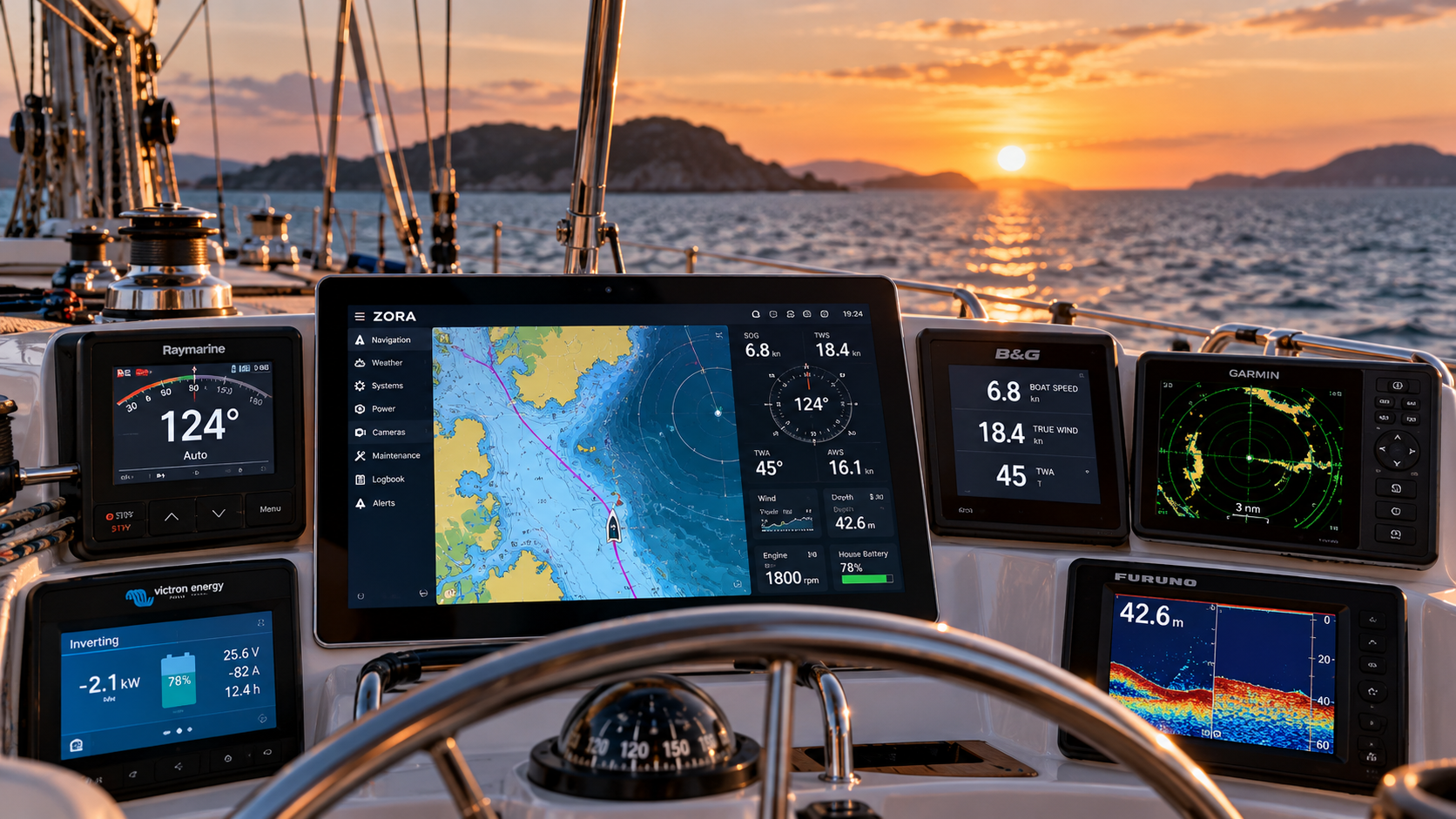
Raymarine, B&G, Garmin, Furuno, Victron and others can often coexist. The important question is how they communicate.
Walk around almost any boat that’s been sailing for a while and you’ll find a history of decisions.
A Raymarine autopilot installed ten years ago.
B&G wind instruments added later.
A newer AIS.
Perhaps a Furuno radar.
Victron equipment in the electrical system.
A new battery monitor.
An old depth transducer that still works perfectly well.
And somewhere along the way, a chartplotter that became the place where many of those things came together.
Then something needs replacing.
That’s often when the owner discovers just how complicated the collection has become.
Do all my marine electronics need to be the same brand?
No.
There can be advantages to buying equipment from one manufacturer, particularly when products use proprietary features or are designed to work closely together.
But modern boats don’t necessarily need to be single-brand environments.
Marine electronics communicate in several different ways, including NMEA 2000, NMEA 0183, Ethernet and manufacturer-specific networks and protocols.
The important question isn’t simply who made the equipment.
It’s:
What information does it produce, how does it communicate, and what needs to consume that information?
Those are very different questions.
NMEA 2000 made mixing equipment much easier
NMEA 2000 was designed to allow marine equipment to share information over a common network.
That means a sensor from one manufacturer can often provide information that equipment from another manufacturer can use.
GPS position, heading, depth, wind, speed, engine information and many other types of vessel data can travel over the same network.
But there’s an important caveat.
Being connected to the same network doesn’t guarantee that every feature of every device will work with everything else.
Manufacturers may use proprietary messages. Some functions require their own controllers. Older equipment may use different physical connectors even when the underlying communication is compatible.
So “it’s NMEA 2000” is useful information.
It isn’t the whole answer.
What about older NMEA 0183 equipment?
This is where many refits get interesting.
NMEA 0183 has been around for decades, and there is an enormous amount of perfectly serviceable equipment still using it.
An older instrument doesn’t automatically need to be replaced because the rest of the boat is moving to newer technology.
Depending on the equipment, NMEA 0183 data can often be brought into a modern onboard environment directly or through an appropriate interface or gateway.
That can make the difference between replacing one component and replacing an entire chain of equipment simply because the pieces were connected.
Manufacturer networks add another layer
Raymarine has SeaTalk and SeaTalkNG.
Simrad has used SimNet.
Manufacturers may also use proprietary Ethernet connections for radar, sonar, cameras and other high-bandwidth equipment.
This is why compatibility needs to be considered at the device and function level, not merely at the logo level.
For example, an autopilot may be perfectly capable of receiving navigation information from another system while still requiring its original course computer and control components.
A radar may use Ethernet, but that doesn’t automatically mean any Ethernet-connected display can control it.
A transducer may still be perfectly good but require a compatible sounder module to interpret its signal.
The details matter.
Before replacing anything, make a map of what you already have
This is one of the most useful things an owner can do before a refit.
Don’t begin with a shopping list.
Begin with the boat.
Write down the manufacturer and model of the major equipment onboard. Identify what network or interface each device uses. Note what still works well, what has failed and what you actually want to change.
Take photographs of the equipment, connectors and network components.
Then look at the relationships between them.
You may discover that the ten-year-old autopilot isn’t actually your problem.
Or that the wind instruments can stay.
Or that an older NMEA 0183 device simply needs a way into the newer network.
Sometimes replacement is absolutely the right answer.
But it should be a decision, not an assumption.
The display doesn’t have to define the architecture
For years, marine electronics have often been built around the multifunction display.
Choose the display, then choose the radar, sonar, instruments and other equipment that work within its ecosystem.
There is another way to think about it.
What if the display were simply a window into the boat?
The underlying operating environment could collect information from different systems and manufacturers, understand the relationships between them and make that information available wherever it’s needed.
The helm display becomes one interface.
A tablet can be another.
A computer at the navigation station can be another.
The equipment underneath doesn’t suddenly become irrelevant.
Quite the opposite.
You can choose equipment because it’s right for the job, rather than because its logo matches the display.
That’s how we think about Zora
Zora was designed around the reality that boats are messy.
They evolve.
Equipment gets added, upgraded and replaced over many years. Different owners make different decisions. Technology changes. And perfectly good equipment often outlives the display it was originally connected to.
Zora supports marine and industrial protocols including NMEA 2000, NMEA 0183, CAN, Modbus and Ethernet-based integrations, allowing information from different parts of the boat to become part of one operating environment.
That doesn’t mean every piece of marine electronics ever manufactured is automatically compatible.
It means we don’t start with the assumption that everything needs to come from us, or even from the same manufacturer.
We start with the boat.
Before you replace the whole system, show us what you’ve got
If you’re planning a refit, replacing a chartplotter or trying to make older and newer equipment work together, send us the details.
Manufacturers and model numbers are useful. Photographs are even better.
We’ll look at what’s already onboard, what can communicate with Zora, what may need an interface or gateway, and what genuinely makes sense to replace.
Keep what makes sense. Replace what doesn’t.